Workflow Automation: Definition and Examples


Workflow automation is the structured handoff of tasks, data and decisions across a repeatable business process. It takes a process that already works and makes the movement between its steps identical every time. Fixed rules run some steps, AI reads the messy inputs in others, and the workflows worth building mix the two.
The handoffs are where the time goes. The task itself takes minutes, but a form can sit in an inbox for the rest of the day while it waits for someone to decide what it is, who owns it and which system needs updating.
This article gives you a one-page spec for mapping a workflow before you build it and a four-question test for which steps get rules and which get AI. It also covers the safeguards that catch the usual failures and the metrics that tell you whether automation saved time or moved it to another team.
TL;DR (Quick Summary)
Manual workflows break at the handoffs, where someone has to interpret an input, update several systems, assign the work and chase it to done. Automate those handoffs with rules, add AI only where inputs vary, and keep a person on any step where a wrong call is expensive or permanent.
- What workflow automation actually replaces → The coordination between steps, and only in processes that have stopped changing
- Map the workflow before automating it → Write a one-page spec; an unmapped process just produces confusion faster
- Deterministic automation vs AI → Rules route and record, AI reads and drafts, and the cost of a mistake sets the boundary
- Workflow automation by function → Each function has one handoff that breaks most often, so design around it
- Safeguards at failure points → Controls at intake, around every AI step and on every retry
- Measuring the result → Capture a manual baseline, then track process and AI metrics separately
- Custom workflow automation → Stay on standard rules until a handoff can't be expressed in them, then build only that part
Takeaway: Rules should own every step you'd want to audit later. AI earns a place where the input varies, and a person signs off on anything you can't undo.
What workflow automation actually replaces in a business process
Manual handoff management goes first, because that's where the time goes. The core task is quick. The transfer points between people and systems are slow.
The McKinsey Global Institute estimated that the average interaction worker spends nearly 20 percent of the workweek looking for internal information or tracking down colleagues who can help with a task.
Take one web inquiry. By hand, a coordinator works through this chain:
- Decide whether it's sales, support or neither
- Check whether the contact already exists in the CRM
- Copy the details into a new or existing record
- Assign an owner and send an acknowledgment
- Set a reminder, then come back to confirm follow-up happened
Each step takes a minute or two. The last one depends on memory, and in a busy week memory loses. A workflow runs the same chain as a defined process: it creates the record, validates required information, assigns the owner, schedules the next task and alerts the team if nothing moves by a set point.
The manual version holds up at normal volume, which is why nobody fixes it. Then a trade show doubles the inbound for two weeks, the coordinator triages by gut, and the reminders for the quieter inquiries never get set. You find out when a prospect replies to a competitor's proposal and copies you on it.
When automation is the wrong tool
Automation locks a process in place. On a stable process, that's the point. On an unstable one, every change becomes a rule rewrite. I wouldn't automate in any of these cases:
- The process changes every few weeks because the business is still working out how it sells or onboards
- Exceptions outnumber the standard path, so the automation would mostly route cases to manual review
- It runs a handful of times a month, and maintaining the rules would cost more time than they save
- The real gap is an undecided question, such as who owns enterprise inquiries, and a rule would only route the argument faster
A written checklist and a shared queue with a named owner cover these cases until the process stops shifting.
Map the workflow before automating it: trigger, inputs, rules, actions, and outcome
Automation runs exactly the logic you give it, gaps included. Write that logic down with the person who does the work today, before you choose tools or add AI. Block a couple of hours for a single-team process. No later stage finds a mistake as cheaply.
The one-page workflow spec
Answer five questions in order, from the real process rather than the SOP. For a web inquiry that becomes a qualified lead:
|
Element |
Question it answers |
Web inquiry example |
|
1. Trigger |
What starts the workflow? |
Form submission on the website |
|
2. Inputs |
What information does it need? |
Contact details, company, message, source, product interest |
|
3. Rules |
What changes the route? |
Sales, support or general queue; assignment by region, product line or account tier |
|
4. Actions |
What happens automatically? |
Create or update the CRM record, assign an owner, send confirmation, create a follow-up task |
|
5. Outcome |
What state counts as done? |
Qualified lead in the right pipeline stage with an owner and a follow-up date |
The SOP misses the steps people do without thinking. The usual one is a glance at the sender's email domain to check whether their company is already a customer. Automate without it and every existing customer who writes in becomes a new lead, assigned to a rep who's never heard of the account.
Pro tip: Pull the last 20 real cases and walk each one through the spec on paper before you build anything. Every case that fits no rule is a missing branch, and a spreadsheet is a far cheaper place to find it than a live pipeline.
Three details that break otherwise sound maps
Most mapping errors sit at the edges of the spec:
- A trigger on "record updated" fires on every edit, so one lead spawns three follow-up tasks. Trigger on creation or on a specific field change.
- An outcome written as an action ("confirmation sent") can't be checked later. Define done as a state the record is in.
- Cases that match no rule need somewhere to land: a default queue with a named owner.
For a process that crosses several teams with parallel approvals, use BPMN 2.0, the Object Management Group's standard notation for business processes. Its swimlanes and decision gateways make every branch explicit. For one team, the table is enough.
Use deterministic automation for routine actions and AI for variable decisions
Some steps must behave identically every time the same conditions appear. Others need interpretation, because the input varies. Give each to the mechanism built for it.
Rules handle process control: moving records between stages, sending standard confirmations, creating tasks, assigning owners by territory or queue, checking required fields and escalating overdue items. A missing required field stops progression. An unapproved request doesn't fire the next action.
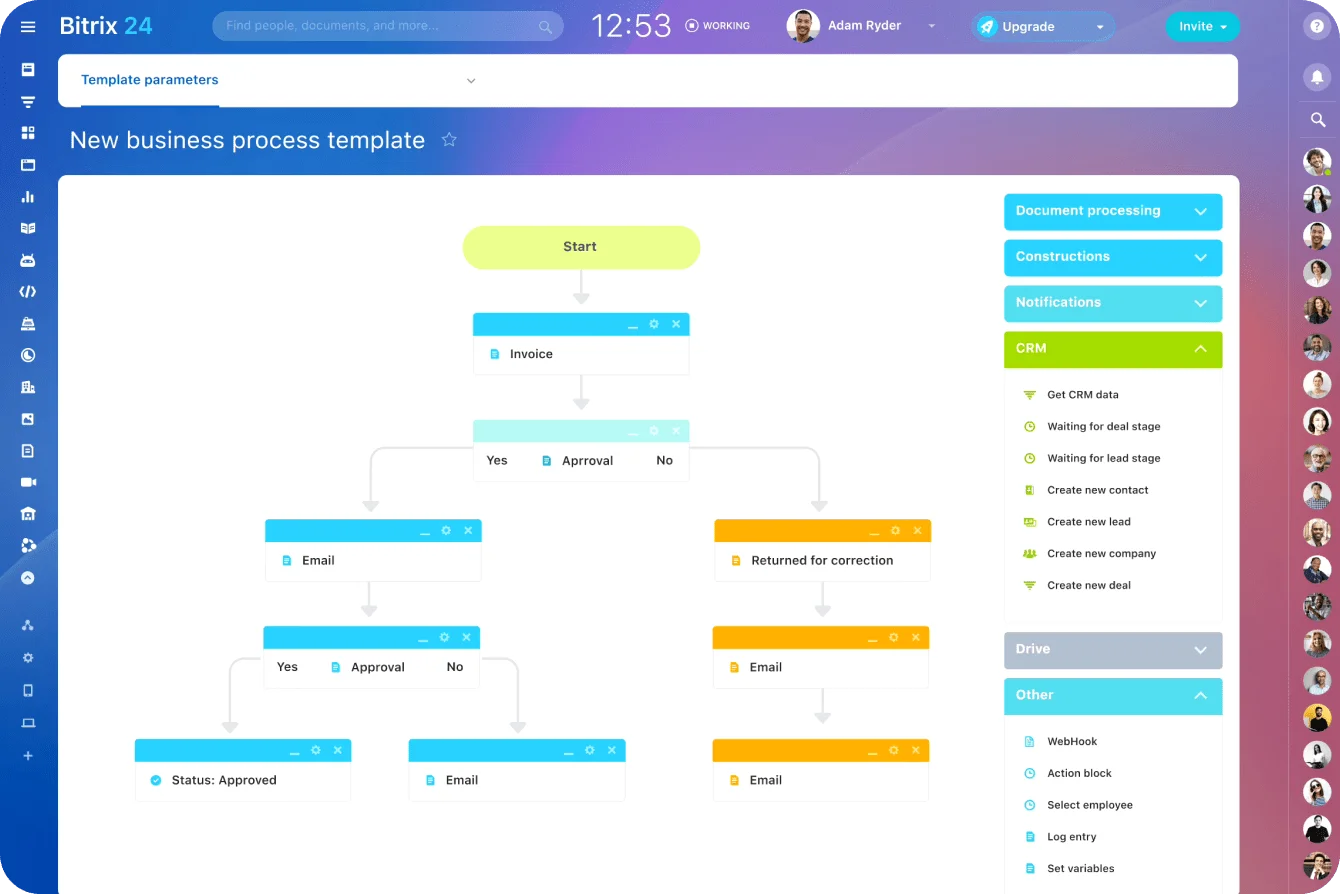
AI handles variation: reading emails and chats, extracting fields from documents, drafting first responses and flagging odd cases. One AI step might read a supplier invoice attachment, pull out the vendor name and invoice number, and hand those fields to the workflow.
Where the boundary goes
Four questions put a step on one side of the line or the other:
- Is the input structured (a dropdown, a date, an ID)? Rules handle it.
- Would two experienced people read the input differently? AI drafts and a person decides.
- Can a wrong result be undone in minutes? AI can act, with spot checks.
- Does the step touch money, contracts or regulated data? Rules govern it and a person approves before it executes.
AI prepares the recommendation or the draft. It doesn't approve a contract change, send a legally sensitive message or close a high-risk case without review. NIST's voluntary AI Risk Management Framework asks organizations using AI to govern, map, measure and manage its risks. In a workflow, that starts with a review gate on high-risk steps.
In Bitrix24, the deterministic side runs on automation rules and triggers across CRM and tasks. A deal moving to the next stage creates a task, changes the assignee or sends a notification, with no code involved.
The interpretation side sits with CoPilot, which transcribes and summarizes calls and autocompletes fields in deals. Both work on the same records, so the guardrail below is a configuration choice rather than an integration project.
The edge case that looks safe in a demo
"AI suggests a category" and "AI writes the category into the field a routing rule reads" look identical in a demo. In the second, the AI is doing the routing, with no person between its guess and the queue the case lands in.
I'd keep AI output in its own field until its labels have been checked against a reviewed sample of about 100 cases. Then decide which categories are reliable enough to drive a route directly.
Urgency labels are where this bites. The customer who writes in capitals with three exclamation marks gets flagged urgent. The one who sends a polite line saying their payroll run failed gets filed as routine. Test the labels against cases your team has already graded, and weight what broke over how the message sounds.

See how workflow automation works in practice across sales, marketing, HR, customer service, and operations
Every function has one handoff that breaks more often than the rest, so build the workflow around that one.
Sales
A web form, email, event scan or chat starts the process. The workflow creates the lead, routes it by region or product line, schedules a follow-up task and moves the deal through sales pipeline stages as activity is logged. AI summarizes the inquiry and drafts a proposal outline from discovery notes, and reps review both before anything reaches the customer.
Speed is the point of automating intake, and fast routing magnifies its own mistakes. A prospect who fills in the demo form and the pricing form ten minutes apart becomes two leads. Round-robin sends them to two reps, and both call within the hour. Check for an open lead on the same email before the routing rule fires.
Example rule: if source = webinar and region = EMEA, assign to the EMEA queue and create a call task due within four business hours; if the lead is untouched at end of day, reassign it to the team lead.
Marketing
A campaign intake form creates a project, assigns owners by channel, collects assets and routes copy and design for approval. AI classifies the request and drafts content variations. Rules own deadlines and publishing approvals, and anything brand-sensitive or legally sensitive gets human review before release.
Example rule: if request type = paid social and budget is above the team's approval limit, route to the marketing lead by name rather than to the marketing group; if there's no decision within two business days, route to the fallback approver.
HR
When a candidate becomes a hire, the workflow triggers account setup, equipment requests, policy documents, orientation and manager check-ins. AI answers unstructured employee questions. The checklist and completion tracking stay rules-driven, and HR tools in Bitrix24 keep those onboarding tasks next to the employee's profile.
The trigger matters more than the checklist. Recruiters often set "hired" at verbal offer, so laptops get ordered and accounts created for candidates who then decline, and IT spends the next week clawing back licenses nobody will use. Trigger on the signed offer.
Example rule: if offer status = signed, create an IT setup task due ten business days before the start date and a manager check-in for the end of week one.
Customer service
AI classifies the issue and suggests a knowledge base answer or a draft reply. The workflow assigns the queue, starts the service level agreement (SLA) timer and escalates overdue cases. Agents own ambiguous or emotionally sensitive conversations.
The edge case is the clock. A four-hour first-response target means one thing in business hours and another in calendar hours, and a ticket logged at 4:55 p.m. on a Friday shows the gap. Decide which clock the SLA runs on, holidays included, and build the timer to match.
Example rule: if AI category = billing and confidence is above your review threshold, route to the billing queue on the business-hours calendar; if no person has replied at 75% of the target time, alert the queue owner.
Operations
Invoice intake, purchase requests and internal service requests all run on validated fields, an approval chain and a status update as each approver acts. AI reads documents that arrive in different formats. Rules own approval order, spend thresholds and final record updates. Bitrix24 RPA is built for this kind of stage-based process, such as document approvals, purchase requests and expense reports.
For invoices, the established control is the three-way match. The purchase order, goods receipt and invoice have to agree on quantity and price before payment is approved. Automate the match with a small price tolerance agreed with finance, and send only the mismatches to a person.
The match checks what you're paying for, not where the money goes. Between 2013 and 2015, a Lithuanian man impersonating a real hardware supplier got Google and Facebook to wire more than $120 million to accounts he controlled. Add the rule the match can't replace: a change to a supplier's bank details holds every payment until someone confirms it by phone, on a number already on file.
Example rule: if PO, receipt and invoice agree within tolerance, mark the invoice approved for payment; if the invoice total exceeds the PO beyond tolerance, route it to the finance lead with all three documents attached.
Build safeguards into the workflow where errors are most likely to happen
Automated workflows fail in the same few places, so that's where the controls go.
Intake controls
Most errors enter here, and the controls are cheap:
- Make critical fields mandatory and block progression when they're empty
- Store phone numbers in the ITU-T E.164 international format so matching works
- Before creating a record, check for duplicates on normalized email, then phone, then company domain plus name
- Confirm required IDs or documents exist before downstream tasks fire
Flag likely duplicates for a person to merge. Auto-merge looks tidy until it combines two people at the same company and sends the next renewal notice to the wrong desk.
Controls on AI steps
Firms already using AI know where it fails. Accuracy was their top AI challenge in the Federal Reserve's 2026 Report on Employer Firms, cited by 46%. An unsure model sends the item to a review queue instead of forcing a decision. When the AI summary conflicts with detected fields or prior records, the case goes to manual handling. Give the review queue an owner and a deadline, or it turns into a holding pen.
Example rule: if classification confidence is below 0.75, route to the Tier 2 review queue for a decision within one business day. Set your own threshold at the point where reviewed cases start going wrong.
Retries, stalls and the audit trail
Integrations fail, notifications don't deliver and approvals sit untouched. Retry a failed step up to three times, with a growing wait between attempts, then escalate to a person. Make retried actions idempotent, meaning a repeat run checks whether the action already happened, so the customer never gets the same email twice.
Send every alert to one person. Escalations to a shared inbox or team channel get read by everyone and acted on by nobody. Within a month, the channel is muted, and the alert that mattered, a refund stuck past its promised date, sits under the routine ones until the customer escalates it for you. Set an expected time for each stage from your baseline, alert the stage owner when an item sits past it, and copy their manager on the second alert.
When something goes wrong, the log has to answer five questions:
- What triggered the workflow
- Which rules fired
- What the AI produced, and at what confidence
- Which fields changed, from what to what
- Where the item was routed and who touched it next
Bitrix24 RPA shows each running process and its current stage on one dashboard, and Flows notify a manager when tasks in progress pass a set limit, so stalls surface without a separate monitoring tool.
Pro tip: Point every customer-facing action at an internal test address and run the workflow against a copy of last week's real records before it goes live. Real records carry the blank fields, odd characters and duplicate contacts that test data never does.
Measure whether the automation is improving the workflow or just moving work around
Judge automation by the whole process, because a workflow can look efficient in one system while it hands cleanup to another team.
Process metrics and AI metrics
Track the two sets separately. A process can speed up while AI output still needs regular correction, and AI can look sharp in isolation while approvals keep the whole workflow slow.
|
Metric |
Type |
Watch for |
|
Turnaround time |
Process |
Cases closed and reopened to stop the clock |
|
Handoff delay (time unassigned or between owners) |
Process |
Spikes after staff changes |
|
Deadline or SLA adherence |
Process |
Which clock the timer uses |
|
Reopen rate |
Process |
Rising while turnaround falls |
|
Exception rate |
Process |
Slow climb as the real process drifts from the rules |
|
Coordination hours saved |
Process |
Review and correction time left out of the count |
|
Classification accuracy against reviewed cases |
AI |
Samples drawn only from easy cases |
|
Draft acceptance rate |
AI |
Agents accepting drafts without reading them |
|
Low-confidence escalation rate |
AI |
Near zero usually means the threshold is set too low |
Capture a baseline before you switch it on
Record two to four weeks of the manual process on the same metrics and definitions, long enough to catch a busy week. Without a baseline, every improvement claim is a guess. After launch, give the process owner about 30 minutes a month with the exception list and reopened cases. Bitrix24 analytics and reports cover the funnel and employee performance views that review draws on.
Take automated inbound routing:
- Before: the coordinator spends about six hours a week routing and chasing requests
- After: the coordinator spends about one hour, and support agents spend about three hours a week fixing misrouted tickets
- Net: two hours saved, against the five the routing report alone suggests
The support team's reopen rate gives it away, and the next fix belongs in the routing rules.
First response time misleads more than any other number. Switch on an automatic acknowledgment and it drops overnight, because the system counts its own email as the first response while customers wait exactly as long for a human. Define first response as the first reply from a person, and check that the report agrees.
Pro tip: Give every record a workflow creates a source value naming that workflow. When the numbers move, one report splits automated records from manual ones.
Create custom workflow automation without building everything from scratch
Standard triggers, assignments, approvals and integrations cover most workflows. Custom work earns its cost when approval logic or record structures don't fit the standard pieces. That happens most when work crosses CRM, HR, support and finance, and each handoff needs its own fields, permissions and exception paths.
Standard, marketplace or custom
Check the options in this order before building anything:
- Standard rules and triggers, if the handoff reads as "when X and Y, do Z"
- An existing integration from the Bitrix24 marketplace, if the gap is a connection to another system
- A custom tool, only for the handoff neither of those can express
Bitrix24 Vibecode covers the third case. It builds custom apps, bots, AI agents and workflow automations inside Bitrix24 from a written description of what you need, and they work with CRM, tasks, chat and documents. A typical build is a cross-department onboarding app that reads the signed offer, creates department-specific setup tasks and sends equipment requests above a spend limit to finance for approval.
I'd build custom only for the step the standard rules can't express, and keep the rest where more than one person can read and edit it. Custom tools break on hard-coded values. Finance raises the approval limit a few months after launch, nobody can change the app without its builder, and approvals drift back to email while the app still shows the old status.
Keep thresholds and approvers as editable settings, and give every custom piece a named owner with its one-page spec stored next to it.
What to check in any automation platform
Bring your spec and those 20 real cases to the demo, and judge the platform on how it handles them:
- Triggers from forms, messages, record changes and external systems
- Rules a non-developer can read and edit
- Human approvals that pause and resume the process
- Reports showing where workflows stall, fail or wait for review
- Connections to the CRM, HR, support and operations tools already in use
FAQ
Is workflow automation the same as RPA?
Traditionally, robotic process automation means software bots that click and type through an application's interface the way a person would, on systems that have no API. Workflow automation moves work between steps and people. The terms blur in practice, and some platforms, Bitrix24 included, use RPA for no-code, stage-based process flows.
Who should own an automated workflow?
The person accountable for the process outcome, usually an operations or team lead. Whoever configured it is a poor default, because they rarely see the exceptions or hear when the process changes.
Automate handoffs without losing control
Bitrix24 unites CRM, tasks, RPA, AI, and analytics to route work, manage approvals, spot stalls, and measure real savings.
Get Started NowAutomate the handoffs, keep the judgment
The spec outlasts the tool. Rules get rebuilt and platforms change, but a written record of what starts the workflow, what it needs and what counts as done is what lets someone fix it two years from now.
Drift is the slow failure. Rules route work to people, and people change roles, go on leave and leave the company while the routing carries on unchanged. Any of these triggers a review of every workflow it touches:
- Someone joins, leaves or changes role in a team the workflow routes to
- A new product line, territory or customer tier appears
- The exception rate rises in two monthly reviews in a row
Task and sales automation, RPA and analytics come with the Bitrix24 Professional plan, and the Vibecode app builder, for handoffs the standard rules can’t express, comes with the Vibe+ plans.Start for free, switch on the 15-day trial of the higher-tier features, and run last month’s real records through the spec for your messiest handoff. Every case that lands in the wrong queue is one your customers won’t have to find for you.
Takeaway: Write the spec before you build and name an owner after you launch. The spec says how the workflow should run, and the owner notices when it stops.