Small Business Growth Hacks: Essential Software Solutions for Success


A small business stops growing at the point where the owner can no longer remember every open quote. Demand keeps arriving. Replies slow down, and finished jobs sit until someone remembers to tell billing.
Most owners read that as a demand problem. Reaching customers and growing sales was the most common operational challenge in the Federal Reserve's latest small business survey, reported by 57% of employer firms. But more inquiries poured into the same broken handovers just leak out faster.
This article matches each common leak to the software category that fixes it, with the setup rules and pre-purchase checks for each. You'll come away able to name your bottleneck, pick the tool built for it, and configure it so the data stays clean.
TL;DR (Quick Summary)
Growth stalls when sales, delivery and admin run on spreadsheets, inboxes and one person's memory. Good software turns each handover into a record someone owns. Bad software adds a subscription on top of the same leak.
- Why growth stalls on spreadsheets, inboxes and memory → the informal system breaks the first week its keeper is away
- Matching software to the problem → describe the leak in one sentence, then buy the category built for it
- CRM and sales software → every open deal needs an owner, a stage and a dated next step, or the pipeline is fiction
- Marketing tools → capture and routing earn more than campaign volume
- Communication, project and operations software → the leaks after the sale cost as much as the ones before it
- Automation → automate stable, tested rules with an owner, and keep judgment calls manual
- Choosing a stack → fit, total cost of ownership and a named tool owner beat a long feature list
Takeaway: Buy software for the handover that's losing money now, and judge it by whether your actual team will keep its data clean.
Why growth stalls when core workflows still depend on spreadsheets, inboxes, and memory
An informal system works while its keeper is in the room. A founder who knows every customer and keeps deadlines in their head can run a tight operation at low volume. It breaks when a second person needs the same information and the only complete copy lives in one head.
Two people touching one customer is the breaking point. One books the call, another sends the quote, and follow-up dies in the gap between them. The problem isn't new. When Harvard Business Review researchers sent web inquiries to 2,241 US companies in 2011, 23% never responded at all.
You've hit the ceiling when you recognize these:
- Only one person can say which quotes are still open
- Customers repeat their request to a second person
- Follow-ups happen when someone remembers
- Finished jobs sit until someone tells billing
- The weekly meeting goes on finding out status instead of deciding anything
The test arrives as a holiday. The owner takes a week off, a client chases a quote nobody else knew existed, and the business finds out its pipeline lived in one person's memory. Nobody did anything wrong. The system had a single point of failure, and the client found it first.
Fix those handovers before you buy more demand. Otherwise, you're paying to generate leads you'll drop.
Match the software category to the growth problem you are actually trying to solve
Vendors all promise efficiency, so the categories blur. Describe the leak in one plain sentence, then match it to the category built for that leak.
|
What you can see happening |
Category that fixes it |
What to check in a trial |
|---|---|---|
|
Inquiries get slow or no replies |
CRM with lead capture |
Can every new lead get an owner automatically? |
|
Deals stall and nobody notices |
CRM pipeline |
Can you filter for deals with no next step? |
|
Quotes take days to go out |
Proposal, quoting and e-signature tools |
Can a quote be built from the deal record without retyping? |
|
Lead flow is lumpy or referral-only |
Marketing: forms, email, landing pages |
Do submissions land in the CRM with their source attached? |
|
Work slips after the sale |
Project and task management |
Does every task require one owner and a due date? |
|
Answers are buried in old threads |
Communication and knowledge tools |
Can a new hire find last month's decision without asking? |
|
Billing lags behind delivery |
Invoicing and operations |
What tells billing a job is done? |
|
The same data gets typed twice |
Automation and integrations |
Which system owns each field? |
The categories meet at handovers. A form submission becomes a CRM record, a won deal becomes an onboarding task list, and a finished job reaches invoicing without anyone retyping it. Each of those handovers needs a system of record: one place that owns a given field, with every other tool reading from it.
Two leaks that look the same
Slow replies to new inquiries are either a capture problem or a capacity problem. In the first, the lead landed in a personal inbox nobody else sees; in the second, everyone saw it and nobody had time. A CRM fixes capture. Capacity needs a hire or a narrower offer, and software only makes that backlog easier to see.
Get this wrong and you pay twice. A team losing leads buys an email marketing suite, sends more campaigns and pours more inquiries into the same unowned inbox. The subscription renews and the leak gets bigger.
Don’t buy anything until the leak fits in one sentence. If it won't, the problem is probably the offer or the pricing, and nothing in that table fixes either. Software makes whatever you sell more consistent, which helps a strong offer and does nothing for a weak one.
Pro tip: Before any demo, run a lost-lead audit. Pull every inquiry from the last month across email, phone, forms and social messages, and trace each one to an outcome: won, lost with a reason, or vanished. The vanished pile tells you which handover to fix and gives you a baseline to measure the new tool against.
Use CRM and sales software to stop losing revenue between first contact and closed deal
A CRM earns its cost through one discipline: every open deal has an owner, a stage and a dated next step. Forecasts and reports are only as true as those three fields.
In Bitrix24's CRM, leads, contacts and deals link to one another, each with its activity history attached, and deals move through pipeline stages you define. The record and the stage rules live in the same place, which is what lets you enforce the discipline instead of asking for it.
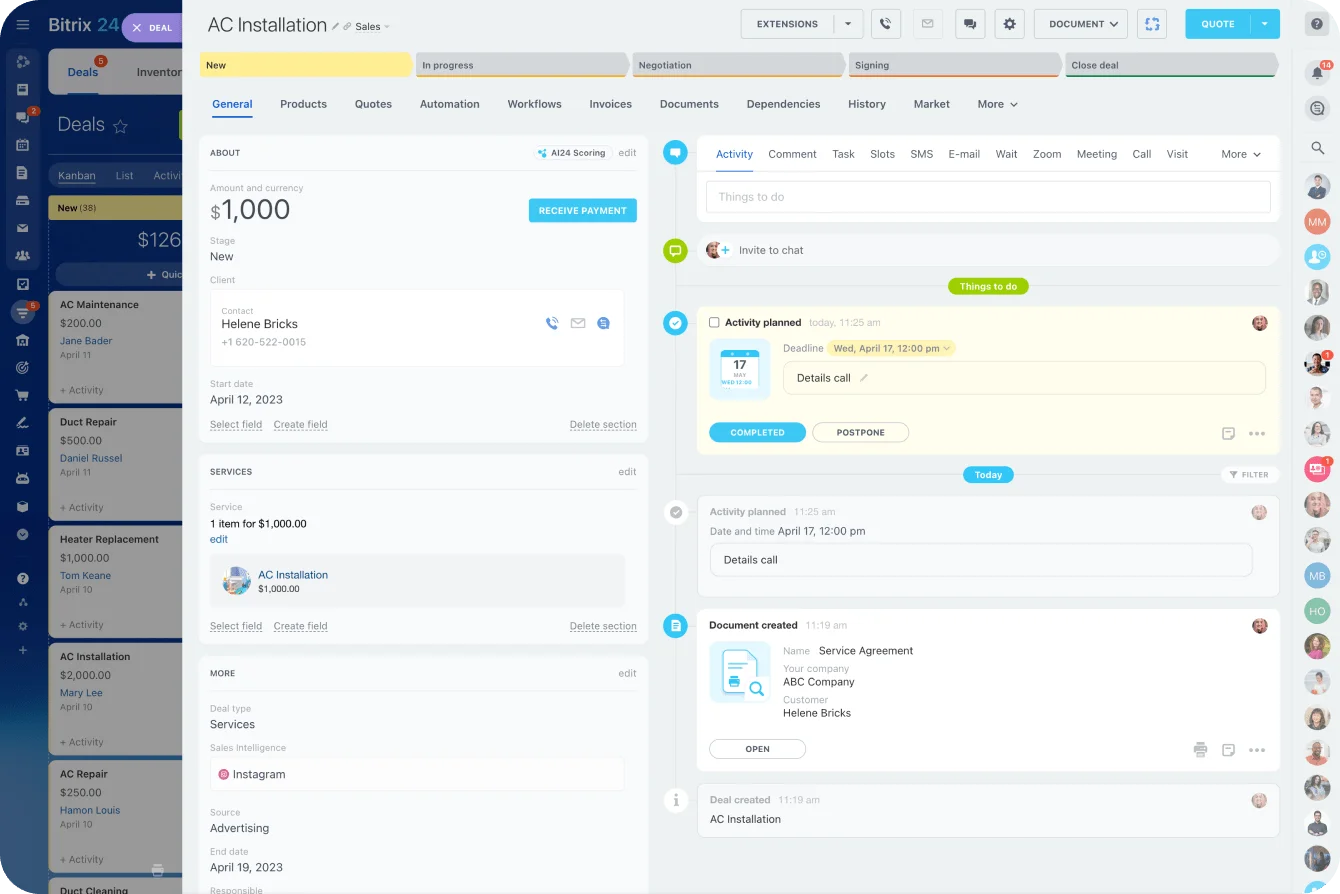
Quick-start: set the rules before you import anything
These take an afternoon to agree and save months of cleanup:
- Store phone numbers in ITU-T E.164 format (+15551234567), so one number can't exist in three formats
- Lowercase and trim email addresses on entry
- Define a duplicate as the same email or the same normalized phone number
- Make lead source a required field with a fixed list of values
- Give every record a named owner, never "team" or "shared"
- Log every new lead the day it arrives, whatever channel it came through
- Set a default follow-up reminder on every new deal (next business day is a sensible default)
Skip these and month three is where it shows. The import from three old spreadsheets turns out to hold the same customer under four names, search stops being trustworthy, and people quietly go back to private lists. Once the side spreadsheet returns, the CRM is just one more place to update.
Define stages by what has happened
A stage should record an event a second person could verify. Stages named for feelings, like "hot" or "promising," turn the pipeline into opinion. Here's an illustrative stage set for a service business:
- New: inquiry logged, owner assigned
- Qualified: budget and timing confirmed on a call
- Quote sent: document out, follow-up date set
- Verbal yes: client agreed, paperwork pending
- Won or lost: every lost deal carries a reason from a fixed list
Keep it to five to seven stages (my rule of thumb, not an industry figure). Past seven, people skip stages and the data stops meaning anything.
Set a response target and measure it
Speed decides whether an inquiry becomes a conversation. In the same HBR research, firms that tried to contact a lead within an hour were nearly seven times as likely to qualify it as firms that waited even one more hour.
For a service business, reply the same business day at the latest. If your buyers request three quotes at once, make it the hour, because the slowest reply of three rarely gets the call. Track the median time to first response every month, since an average hides the leads that waited three days.
How much sales software you need
Quoting, scheduling and e-signature tools close the gap between "sounds good" and a signed order. In Bitrix24, estimates, e-signature and online payments attach to the deal they belong to, so nobody has to check a separate app to see whether the client signed.
Match the depth to how you sell. A short cycle with one or two people selling needs a lightweight CRM with basic quoting. Several handovers and recurring follow-up gaps call for a structured pipeline with reminders. Custom proposals and forecasting are the point where a heavier sales platform starts paying for itself.
Ask every vendor one question: will this make sales execution more consistent for the team you actually have? Enforced basics beat deep customization nobody maintains.

Support demand generation with marketing tools that capture interest and keep leads warm
For a small business, the marketing tool that earns its keep is the form. Campaigns create interest. Capture and routing decide whether that interest becomes a conversation.
Capture and routing
Here's an example setup for a local service business offering a free consultation:
A landing page collects inquiries, the form drops each one into the CRM with its source and an owner, and a short email sequence keeps the lead warm until the call. Bitrix24's marketing tools connect forms, landing pages and email campaigns to the same CRM records, so a campaign lead arrives with its source already attached.
Four rules for the form:
- Ask only for what the first reply needs
- Capture source with UTM parameters (utm_source, utm_medium, utm_campaign), never by asking the visitor
- Keep UTM values lowercase, since Google Analytics treats "google" and "Google" as different sources
- Route each submission to a named person, never a shared inbox
A three-email sequence that does the job
Three emails cover most consultation-led businesses. The timings are an illustrative example:
- Welcome, sent instantly: confirms the request, names who'll call and when
- Proof, two days later: one short case from a customer like them, with the problem and what changed
- Call to action, the day before the call: what to prepare, plus a link to reschedule
Kill the sequence the moment the lead books, buys or replies. An email that arrives after a human conversation has started reads as a machine that wasn't listening.
Consent and deliverability
Set up SPF, DKIM and DMARC on your sending domain before the first campaign goes out. Google's sender guidelines require all three from bulk senders, and one-click unsubscribe on marketing messages from anyone sending more than 5,000 messages a day to Gmail accounts.
US senders also need the CAN-SPAM basics: a valid physical postal address in every commercial email and opt-outs honored within 10 business days. If any contacts are in the UK or EU, you need a lawful basis for each list under GDPR.
Skip this and the failure is invisible. The first campaign lands mostly in spam, nobody sees a bounce, and the team reads the silence as a weak offer and rewrites copy that was never the problem.
Stop work and cash slipping after the sale with project, communication, and operations software
The leaks after the sale are quieter than the ones before it. They show up as a missed deadline, a client chasing an update, or an invoice that went out three weeks late.
Task ownership rules
A task tool makes ownership visible only if the rules are strict:
- One accountable owner per task (the "A" in a RACI chart); others can watch
- A due date on anything a customer will notice
- A written definition of done on recurring work, such as "onboarding done = kickoff held, access granted, first invoice scheduled"
- A template for every sequence that repeats: onboarding, installs, renewals
Bitrix24's task management puts Kanban boards, Gantt charts and checklists on the same tasks, and repeat sequences run from templates. Service businesses that don't think of themselves as project-based gain the most here. Their onboarding and renewals are projects nobody wrote down.
Watch for tasks assigned to "the team." Everyone assumes someone else picked it up, the due date passes, and the client is the first to notice.
Where chat fits
Chat is where decisions get made and lost. The fix is a rule more than a tool. Anything a customer will hold you to moves out of chat and onto the task or deal it belongs to. Bitrix24's communication tools put chat and video calls in the same workspace as tasks and deals, so moving a decision onto its record doesn't mean switching apps.
Operations: the gap between done and invoiced
Invoicing is a growth problem because cash is. Half of small employer firms reported uneven cash flow as a financial challenge in the Federal Reserve's 2026 Report on Employer Firms, a category the survey defines to include collecting on receivables.
Track days sales outstanding (DSO), the average number of days between sending an invoice and getting paid. If DSO creeps up while revenue grows, you're financing your customers.
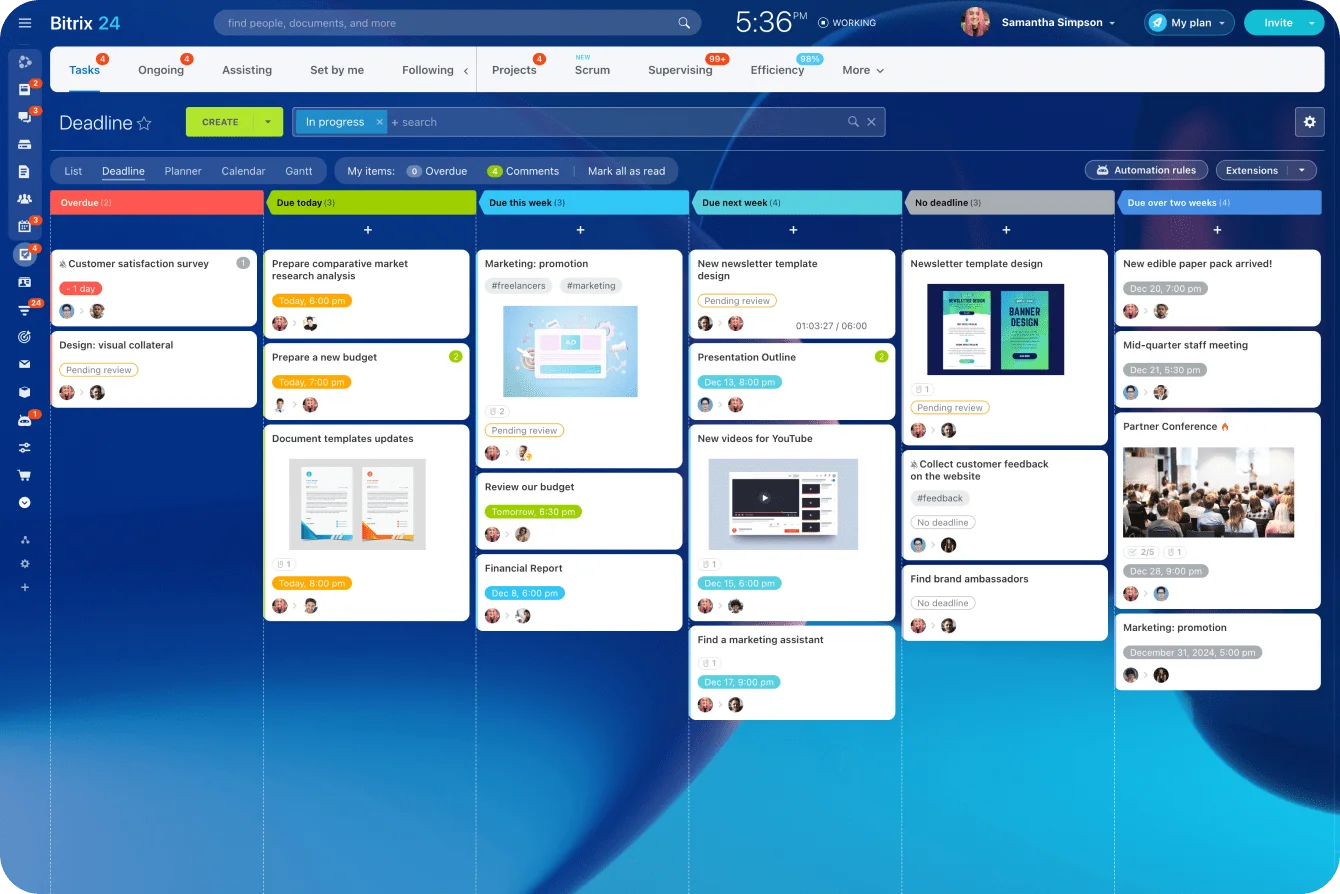
A business can be busy, well reviewed and short of cash in the same month. The cause is completed work nobody flagged to whoever sends invoices, sometimes for weeks. Put a billing trigger on the final delivery task so the handover can't depend on memory.
Use automation to remove repetitive work before you hire around avoidable inefficiency
Write every automation rule in one format: trigger → condition → action → owner. "Deal marked won → service package is Standard → create onboarding checklist → owned by delivery lead" is a rule. "Automate onboarding" is a wish.
Automation lets a small team absorb more volume before hiring for admin. It also spreads mistakes at machine speed. A bad routing rule misroutes every lead, and a wrong customer record does more harm once it syncs to three systems.
When a process is ready to automate
Run each candidate through these checks (the frequencies are my recommendations):
- It happens at least weekly
- The rule fits in one sentence with an "if"
- It hasn't changed in the last couple of months
- Someone owns it and will see when it fails
- A wrong run is cheap to undo
I wouldn't automate anything that messages a customer until someone has run it by hand from the written rule for a few weeks without hitting an exception.
The best returns sit in handovers between functions:
- Web form submission → CRM record and owner assignment
- Booked meeting → calendar event and confirmation email
- Won deal → onboarding checklist, internal notification and welcome message
- Completed milestone → invoice creation
- Overdue invoice → reminder sequence
Bitrix24's automation runs rules on deal and task changes, so a won deal creates the onboarding tasks and notifies the delivery lead without a connector in between. Task automation, sales automation and RPA are listed on the Professional plan and above, so confirm the tier before you design around them.
Test before it touches a customer
Big companies skip this step too. In June 2021, HBO Max sent part of its mailing list an empty email titled "Integration Test Email #1," then confirmed on its help account that an intern had sent it. Twitter treated it as a new series. Your customers will be less generous.
No rule goes live until it passes these checks:
- Run it against test records with obviously fake names, so nobody mistakes them for customers
- Send customer-facing messages to an internal staging list first
- Turn on a log entry for every run and a separate alert for every failure
- Name one person who handles the exceptions the rule can't
Once rules are live, three failures do most of the damage:
- Duplicates, which send one customer two welcome emails (deduplicate before any trigger fires)
- Two-way syncs, where an old value in one tool overwrites a new one in the other (sync one way, from the system of record)
- Round-robin routing that keeps assigning leads to someone on leave (route around anyone marked unavailable)
Invoice reminders carry their own trap. A reminder that's purely about the invoice is a transactional message under CAN-SPAM. Add a promotion and it can become a commercial email with the full set of obligations, at up to $53,088 per violating email. Keep reminders about the invoice and nothing else.
The worst version chases a client who paid last week by bank transfer. The payment sits in the accounting tool, the CRM never hears about it, and a polite customer gets three increasingly firm emails about money they've already sent. One sync rule would have stopped it, and nobody thought to write it.
Pro tip: Name every automation after its trigger and owner, like "Web form → new lead → assign: Sam." When something misfires at 6 p.m., whoever spots it knows which rule to pause and who to call without opening every rule to check.
Choose a software stack that fits your current stage, budget, and capacity to adopt it
The best stack is the one your team will keep clean. Feature count stops mattering the week nobody maintains the data.
All-in-one or connected tools
|
All-in-one platform |
Focused tools, connected |
|
|---|---|---|
|
Best when |
Leaks sit across handovers between sales, delivery and billing |
One function needs deep specialist features |
|
Hidden cost |
Learning a broader tool |
Connector fees and upkeep |
|
What breaks first |
Adoption, if setup is skipped |
The integrations, often silently |
|
Who maintains it |
One admin |
Whoever built each connection |
Point-tool stacks fail quietly. A connector between the form tool and the CRM stops after a password change, nobody gets an alert, and the team spends two weeks assuming leads have dried up.
When an all-in-one isn't the answer
Some functions need a specialist. Regulated accounting and industry-specific dispatch both run on rules a general platform won't match, so keep the specialist and connect it.
Bitrix24 is built as one workspace for selling and delivering the work. It handles estimates, invoices and payments, but it isn't a general ledger. Your accounting stays in your accounting software and connects through integrations.
What it actually costs
License fees are the part you see. Count the rest before you compare prices:
- License, and how it scales as you hire
- Weekly admin hours to keep data and automations clean
- Integration upkeep: connector fees and time spent fixing breaks
- Training for each new hire
- Exit cost: whether your records export with notes and history
Take ten people on four per-seat tools at $15 a seat each. That’s $600 a month. Add three hours a week of an owner’s time on admin and connector fixes, and the time can cost as much as the licenses before anyone counts training.
Pricing models change that math. Bitrix24 charges a flat price per organization, with a user limit for each plan, so adding people within that limit doesn't raise the bill. Basic costs US $49/month for 5 users and $99/month for 50, both billed annually. Standard is where invoices, estimates, e-signature, and the web form designer come in, and email marketing joins task and sales automation on Professional (US$199 a month for 100 users). Plans and pricing have the current details.
Name a tool owner
Every stack needs one internal owner who sets field rules, approves new automations and gets the alert when something breaks. Budget a couple of hours a week for the role. Without an owner the stack drifts until nobody trusts the data, and then the business buys a new tool to fix a maintenance problem.
Pro tip: During any free trial, export your test data before you decide. Check that notes, activity history and deal stages come out in a usable CSV along with the contacts. A tool that's easy to enter and hard to leave raises the cost of every decision after it.
FAQ: practical questions small businesses ask before investing in growth software
If budget is tight, which software is worth paying for?
The one that fixes your most expensive inconsistency. In most service businesses that's a CRM, because lost follow-up costs revenue directly. If delivery is where clients get let down, a task and project tool comes first in the budget.
Is it better to use one all-in-one platform or several specialized tools?
Neither wins by default. An all-in-one platform cuts integration work and admin. Specialized tools go deeper in one area, but they only pay off if someone owns the connections between them and notices when one breaks.
How can a business tell whether a process should be automated or kept manual for now?
Automate when the same trigger should produce the same action nearly every time and the rule hasn't changed recently. Keep it manual while it still depends on judgment or frequent exceptions. The readiness checklist in the automation section has the specific tests.
How do we know the new system is working?
Measure the leak you bought it to fix, monthly:
- Share of open deals with a dated next step
- Median time to first response against your target
- Days sales outstanding
- Leads with no recorded outcome after 30 days
If those numbers haven't moved within a quarter, look at the habit around the tool before you shop for another one.
Close the workflow leaks holding growth back
Bitrix24 unites CRM, tasks, automation, quotes, and invoices so every lead, deal, and handover has an owner and a next step.
Get Started NowThe bottom line
Every system in this article asks for a habit in return, and a CRM full of stale deals is worse than a spreadsheet everyone knows is rough.
The best test of whether the habit stuck is the one that exposed the problem in the first place. Take a week off. If nobody has to call you to find out where a quote stands, the software is earning its fee. If they do, you've paid for a tool that records your leaks instead of closing them.
In Bitrix24, the CRM, task boards and automation rules all work from the same deal and task records, so there's one habit to keep instead of four.
Start a free Bitrix24 account and run last month's real deals through it before you commit.
Takeaway: A tool fixes a leak only when someone owns the handover it sits on, so choose the owner as carefully as you choose the software.